

Improve your first skill
Takeaway: You will connect an SCM account, explore your Organization's Context and Findings, improve a local skill, run an eval that measures the skill's effect, and publish a new version your team can install.
This is the end-to-end loop you will repeat with Tessl: see what context your Organization has, find what needs attention, make it better, measure the effect with an eval, and ship it. A few terms show up along the way, namely skills, plugins, Organizations, workspaces, reviews, and evals. You can follow every step without reading ahead; each term links to a fuller explanation in Core concepts. As a quick orientation: an Organization owns SCM connections and reporting, a workspace controls private publishing, and a project ties Tessl to a single repository.
Before you start
- Finish Set up Tessl: create an account, install and authenticate the CLI, and run
tessl init. - Create a Tessl project for this repository with
tessl project create <name> --workspace engteam. Evals are saved to a project, andtessl eval runstops without one. If you belong to more than one Organization, add--org <name>or setTESSL_ORG; a non-interactive shell cannot prompt you to pick one. - Have Publisher access or higher in the workspace where you publish and run evals.
- Have a plugin that contains your skill. A Tessl plugin is a folder with a
.tessl-plugin/plugin.jsonmanifest; a Claude Code plugin's.claude-plugin/plugin.jsondoes not count. If you have aSKILL.mdwithout a manifest, import it. If you have no skill yet, runtessl skill new. - For Steps 1 through 3 only, an Organization admin must connect the SCM account.
Choose a path
Your Organization has an SCM connection: start at Step 1.
You have a plugin on disk and no SCM connection: skip to Step 4.
Step 1: Connect an SCM account
No SCM connection? Go to Step 4.
In the Tessl web app, select your Organization, then open Settings and Integrations. Under Source control, add your provider and authorize the repositories Tessl should scan. See Connect Tessl to GitHub for the GitHub flow.
Tessl starts an account scan after the SCM connection is created. The connection can succeed before the scan starts or finishes, so use the connection page to check scan status, retry a failed scan, or change its Scan scope.
Step 2: Explore Context
Select your Organization, then open Context in the sidebar. Context shows the skills and configuration Tessl observed, including their repositories and paths. You can search the collection and filter it by state, score, security result, and other attributes.
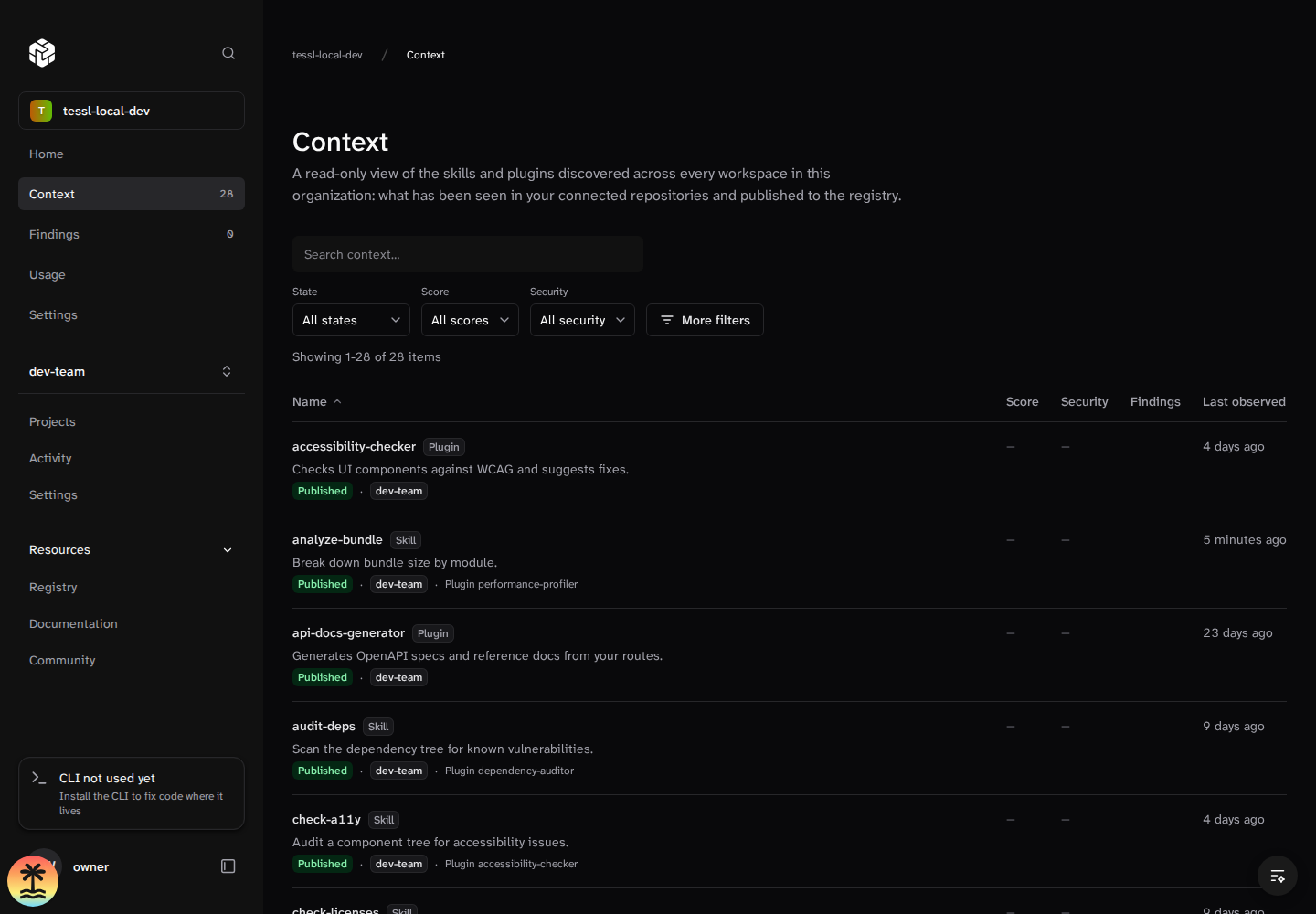
After scan analysis succeeds, Tessl starts indexing the repository skills it found. There is no separate private-indexing switch or first-party approval step. Indexing, review, and security scoring are background work with separate failure paths, so a Context item can appear before it has scores, and not every item is guaranteed to receive a score.
Step 3: Inspect Findings and results
Open Findings to see issues reported from the latest account scans. Use the filters to narrow the list by category, priority, repository activity, status, or workspace. Select a finding to review its evidence and suggested next step. Some advanced finding details depend on your Organization's plan.
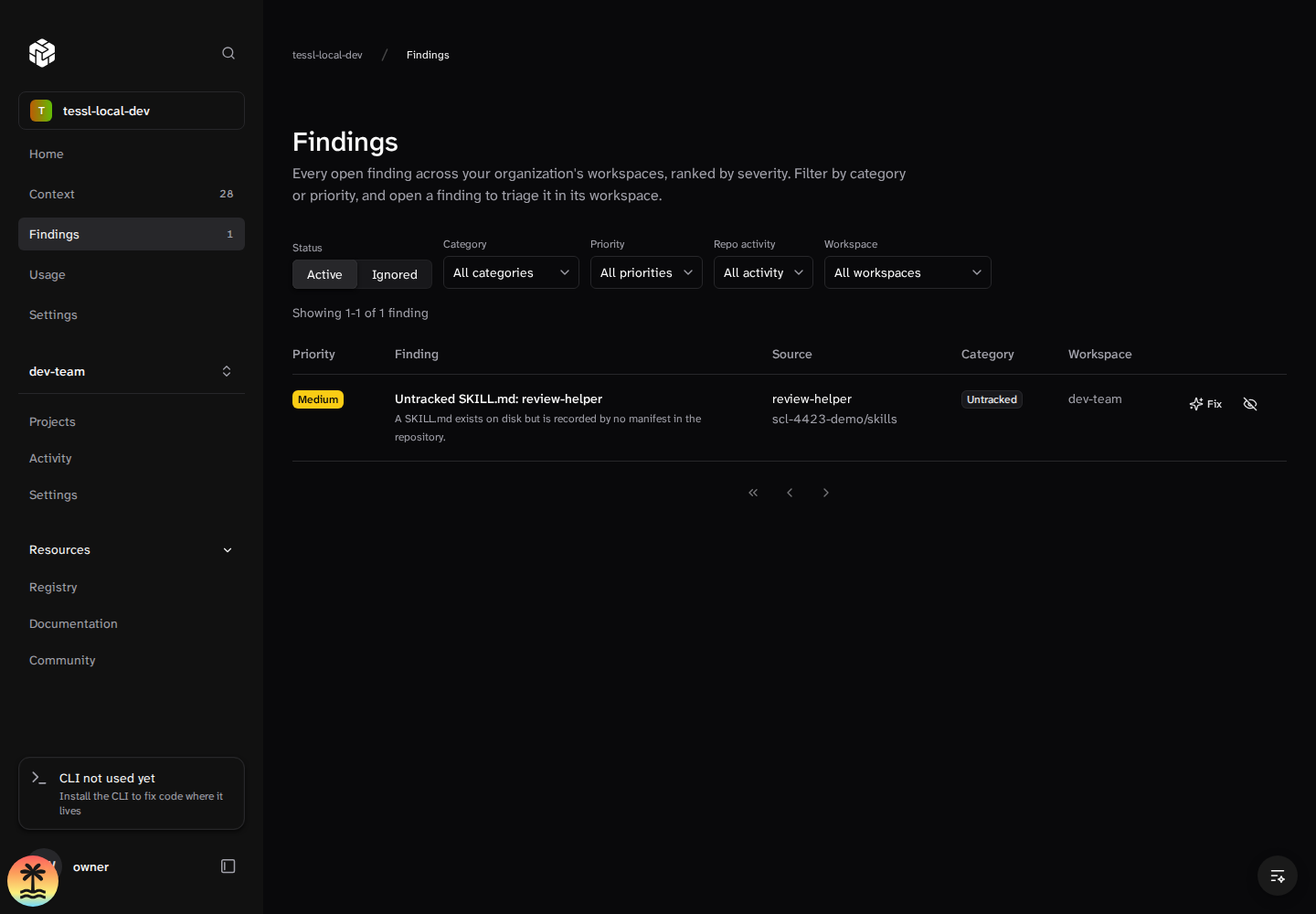
A skill can need attention for different reasons, and a single skill can have more than one result. They are worth telling apart because each has its own fix.
The first is a low review score. A review measures the quality of the skill itself: how clear and actionable its instructions are, and how well its description tells an agent when to use it. This is the kind of problem you fix by improving the skill.
The second is a security finding. Tessl scans skills and plugins for risky or malicious patterns in their content and behavior, such as prompt injection hidden in the instructions, hardcoded secrets, suspicious download URLs, or obfuscated text, and warns you about anything critical or high severity. This is about safety rather than quality, so it is separate from the review score.
For this walkthrough, pick a skill with a low review score, a security result, or a Finding such as drift, overlap, or stale content. If the skill has no score yet, you can still review it directly in the next step. Check out the repository that contains the skill and change into it before you run the review.
Step 4: Improve it
The commands below use two folders:
<skill-folder>is the folder that holdsSKILL.md, for example./my-plugin/skills/my-skill.review runandreview fixtake this folder.<plugin-folder>is the plugin root, the folder that holds.tessl-plugin/plugin.json, for example./my-plugin.scenario generate,eval run, andskill publishtake this folder.
Run a review to see the detailed breakdown:
The review runs server-side against your workspace and returns three scores: validation (structure and formatting), description (how well the description triggers the skill at the right time), and content (how well the instructions guide the agent once loaded). Each comes with specific suggestions.
To apply those suggestions automatically, run a fix:
tessl review fix runs an improve-and-review loop, applying changes and re-reviewing until the score reaches 90% or it has run three improve rounds. Pass --threshold and --max-iterations to change those limits. In a terminal it asks before applying the changes. In CI or a piped shell it applies nothing unless you pass --yes. Run a review once more to confirm the score went up. Aim for 70% or higher before you publish; the fix loop's 90% target is a stopping point, not the bar for publishing.
A security finding is handled differently, because it is about safety, not quality. Tessl never blocks you; it warns you before installing a skill or plugin with critical or high severity findings so you can decide whether to proceed. If it is your own skill, fix the flagged content, for example by removing a hardcoded secret or a suspicious URL. If it is someone else's, treat a serious finding as a reason not to install, since it can signal a compromised skill. You can read more in Core concepts.
Step 5: Prove it works with an eval
An eval runs an agent on tasks with and without your plugin and scores the difference; a review shows whether the skill is well written, while an eval shows whether it works.
An eval needs scenarios. Without them there is nothing to run.
Generation runs on the server and usually takes several minutes. In a terminal, the CLI waits. In CI or a piped shell, it exits at once; pass --wait to wait for it, or check progress with tessl scenario list --mine.
Once generation completes, download the scenarios into the plugin's evals/ folder. Download rejects a generation that is still in progress.
Without --output, download writes to the plugin's evals/ folder only when you run it from inside the plugin folder. Elsewhere it writes to ./evals, and tessl eval run ./<plugin-folder> then finds no scenarios. --last downloads your most recent generation from any plugin or folder. If you started another generation since, pass the generation ID that scenario generate printed instead of --last.
In a terminal, the CLI waits for the eval to finish. In CI, a piped shell, or with --json, it submits the run, prints its ID, and exits 0 without waiting. Pass --wait to wait up to two hours, or --wait-timeout 30m to set your own limit. If the run finishes within the limit, the exit code reports its result. If the limit runs out first, the CLI exits non-zero with "reached the wait limit", but the eval keeps running on the server. Don't start another run; check the existing one with tessl eval view <id>.
The result reports the lift in percentage points between the agent's scores with and without the plugin. In the per-variant tables, baseline is the run without the plugin and usage-spec is the run with it. See View a run for real CLI output.
By default, US-region evals use agent claude with model deepseek-v4.1-flash; before a large run, the CLI prints a credit estimate, and https://tessl.io/pricing/ has current pricing details.
Next, learn about the plugin impact eval in depth or compare models.
Step 6: Publish a new version
Once the skill passes review and the eval shows it works, publish it to your workspace and bump the version in one step:
Use patch, minor, or major depending on the size of the change. --bump only changes the version when the manifest's version is already published. On a first publish, the manifest's version, for example 0.1.0, is published unchanged. Skills publish as private by default, so only members of your workspace can install them. A review runs automatically on publish, and publishing also runs an evaluation and shows its results on the registry; see Evaluations when you publish. Teammates pick up your new version by installing it:
That is the full loop. You connected or uploaded repository context, found a skill to improve, checked its quality, improved it against best practices, measured its effect, and shipped a better version to your team.
Where to go next
- Improve a skill in more depth, including comparing test variants and evaluating it against real tasks.
- Roll context out across your repositories automatically with the repository integration.
- Understand the building blocks you just used in Core concepts.